Year 1 · Week 02
Chapter 2: Mapping Your Robot's Journey
Last week, you learned how coordinates help us describe exactly where things are on a map. This week, we're going deeper: not just where things are, but how far apart they are—and why that matters when programming a robot to navigate the world.
Imagine you're a robot. You can see a target on a map, but can you figure out how to get there? Let's find out!
Quick Review: The Coordinate Plane
Remember from last week: a coordinate plane is like a treasure map with two number lines crossing at the center.
- The horizontal line is the X-axis (left and right).
- The vertical line is the Y-axis (up and down).
- Where they cross is called the origin, marked as (0, 0).
Any point on this map can be described with two numbers: (x, y). The first number tells you how far left or right to go, and the second tells you how far up or down.
The Distance Problem
The Challenge: Your robot is sitting at point A, and needs to drive to point B. You know where both points are on the map, but your robot needs to know: How far do I need to travel?
If point A is at (1, 2) and point B is at (4, 6), you can't just say "drive forward." You need to calculate the distance between these two points.
The Math Fix: This week in class, we'll learn how to calculate the exact distance between any two points on our coordinate plane. This will help us program our robot to move precisely from one checkpoint to another!
Why This Matters for Your Robot
When you program your LEGO SPIKE Prime robot, you'll tell it things like:
- "Drive forward 5 units to reach the checkpoint."
- "Turn 90 degrees, then move 3 units."
But how does the robot know how far to drive? It uses motor rotations. If you know the distance and the size of your robot's wheels, you can calculate exactly how many degrees the motors need to turn.
If one full wheel rotation (360°) moves the robot 17.6 cm,
then to move 44 cm:

Motor degrees = (44 ÷ 17.6) × 360 = 900°
This week, you'll use helper functions like move_for_degrees(900) to tell the
robot exactly how far to go. The math makes it precise!
💻 Computer Setup: Get Ready to Code!
Before we can program our SPIKE Prime robot, we need to set up our computer. You have two options:
From Word Blocks to Python
Last year's students programmed their solution using Word Blocks, a visual programming interface that makes coding feel like building with LEGO bricks. Here's what their code looked like:
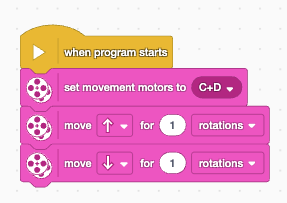
Word Blocks are intuitive and easy to understand—you can see exactly what the robot will do just by looking at the blocks. But this year, we're going to use Python instead. Here's the same program written in Python:
from hub import port
import runloop, motor_pair

async def main():
    # write your code here
    motor_pair.pair(motor_pair.PAIR_1, port.C, port.D)
    await motor_pair.move_for_degrees(motor_pair.PAIR_1, 360, 0, velocity = 360)

runloop.run(main())
Why Python Instead of Word Blocks?
If Word Blocks are so much more intuitive, why would anyone use Python? Great question! Here are some common reasons:
- Scalability: Word Blocks get messy and hard to manage when programs grow large. Text-based code stays organized even with hundreds of lines.
- Precision and Control: Python gives you fine-grained control over every detail. You can create complex calculations, custom functions, and advanced logic that would be tedious in blocks.
- Real-World Skills: Professional engineers, data scientists, and AI researchers use text-based languages like Python. Learning it now opens doors to real careers.
- Collaboration: Code can be easily shared, reviewed, and version-controlled using tools like Git. This is essential for team projects.
- Libraries and Resources: Python has thousands of libraries for everything from machine learning to web development. Word Blocks are limited to what's built in.
📖 Reading Documentation
One crucial skill for programming is learning to read documentation. Documentation tells you how to use different functions and what their parameters mean.
Look at this line from our Python code:
await motor_pair.move_for_degrees(motor_pair.PAIR_1, 360, 0, velocity = 360)
The function move_for_degrees takes several parameters. The first 360
is the number of degrees the motor should rotate. This is how far the robot
will move.
Making It Easier: Creating Helper Functions
Working with degrees is inconvenient. When planning our robot's path, we think in real-world distances like "move 50 centimeters forward," not "rotate the motor 1,028 degrees."
This is where we can create our own helper function to convert distance into degrees:
WHEEL_CIRCUMFERENCE = 17.5

# input must be in the same unit as WHEEL_CIRCUMFERENCE
def degreesForDistance(distance_cm):
    # Add multiplier for gear ratio if needed
return int((distance_cm/WHEEL_CIRCUMFERENCE) * 360)Now instead of calculating degrees manually, we can just write:
degrees = degreesForDistance(50) # Move 50 cm forward!Python Unlocks Strategic Advantages
Here's a powerful example of why Python matters in competitions: By writing code in Python, we can leave more of the work to the program and position our robot more strategically at the start.
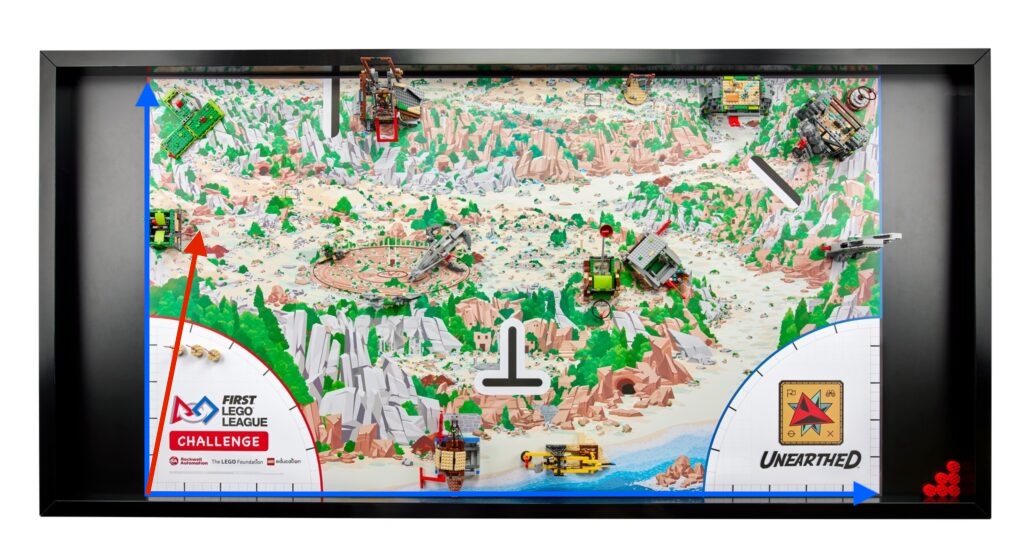
Alternative starting point: With Python, we can handle complex movements and calculations in code, allowing us to position the robot in more advantageous starting locations for competition runs.
In Word Blocks, complex navigation and calculations are harder to manage, often forcing teams
to position their robot in simpler (but less optimal) starting positions. With Python's
ability to handle precise calculations, conditional logic, and helper functions like
degreesForDistance(), we can confidently start from positions that give us
strategic advantages—even if they require more complex initial movements.
This is just one example of how text-based programming opens up possibilities that would be impractical with visual blocks. As your programs grow more sophisticated, Python's power becomes increasingly valuable!